Getting started: your first request
In this tutorial you install Protem's custom resources into a cluster you are admin on, start the operator with built-in test users, request a self-service grant and watch it become a RoleBinding, then request a grant that needs approval, approve it as a different person, revoke a grant, and watch one expire on its own.
You need: Go 1.26+, kubectl, and a Kubernetes cluster as your current context (kind and k3d both work) where you are cluster-admin. Nothing here needs a real identity provider or a second cluster.
1. Clone the repository and install the CRDs
This applies the five custom resource definitions Protem adds — TargetCluster, AccessProfile, AccessRequest, AccessGrant, ClusterGrant — described in Concepts. It ends with five customresourcedefinition.apiextensions.k8s.io/... created lines.
2. Make the test admin a hub admin
This binds the built-in admin@company.com test persona to a ClusterRole that can manage profiles, clusters, requests and grants. Without it --dev-auth's test personas are plain users with no hub-admin rights.
3. Register the hub as a cluster
Protem always needs at least one TargetCluster: the cluster the operator runs on. Save this as hub-cluster.yaml:
apiVersion: protem.dev/v1alpha1
kind: TargetCluster
metadata:
  name: local
  labels:
    env: dev
spec:
  displayName: Hub cluster
This is the resource Concepts describes: a cluster Protem can grant access on. metadata.name must match the operator's --hub-cluster-name flag, which defaults to local.
4. Create two profiles
An AccessProfile is what can be requested. Save this as profiles.yaml — one profile granted at once, one that needs an approver:
apiVersion: protem.dev/v1alpha1
kind: AccessProfile
metadata:
  name: read-default
  namespace: default
spec:
  displayName: Read the default namespace
  role:
    kind: ClusterRole
    name: view
  scope: Namespaced
  namespaces: [default]
  clusters:
    names: [local]
  duration:
    default: 1h
    max: 4h
  requesters:
    groups: [devs]
  justification:
    reason: Required
  approval:
    rules:
    - name: self-service
      mode: Auto
---
apiVersion: protem.dev/v1alpha1
kind: AccessProfile
metadata:
  name: edit-default
  namespace: default
spec:
  displayName: Edit the default namespace
  role:
    kind: ClusterRole
    name: edit
  scope: Namespaced
  namespaces: [default]
  clusters:
    names: [local]
  duration:
    default: 2m
    max: 1h
  requesters:
    groups: [devs]
  justification:
    reason: Required
  approval:
    pendingTimeout: 1h
    rules:
    - name: sre-leads-approve
      mode: Manual
      approvers:
        groups: [sre-leads]
      requiredApprovals: 1
read-default's one approval rule is mode: Auto, so any matching request is granted at once. edit-default's rule is mode: Manual and needs one approval from the sre-leads group — its default duration is two minutes, short enough to watch it expire later in this tutorial. Concepts explains the rest of the fields.
5. Start the operator
Note: this tutorial's commands use port 8080, the operator's default. If something on your machine already uses it, add --api-bind-address=127.0.0.1:<a free port> and open that port instead.
--dev-auth replaces login with built-in test personas (alice@company.com, a requester; bob@company.com, an approver in sre-leads; admin@company.com, made a hub admin in step 2) chosen from the UI instead of a real identity provider. Leave this running; open a new terminal for the rest of the tutorial, or run it in the background.
Within a few seconds kubectl get targetclusters shows local as Ready, because the hub is always its own TargetCluster and needs no agent:
$ kubectl get targetclusters
NAME    DISPLAY NAME   PHASE   AGENT VERSION   ACTIVE GRANTS   LAST HEARTBEAT
local   Hub cluster    Ready
6. Request the self-service profile
Open http://127.0.0.1:8080 in a browser. The account menu at the bottom left is already set to Alice, a requester. On the For you page, under "Access you can activate", choose Activate access for "Read the default namespace".
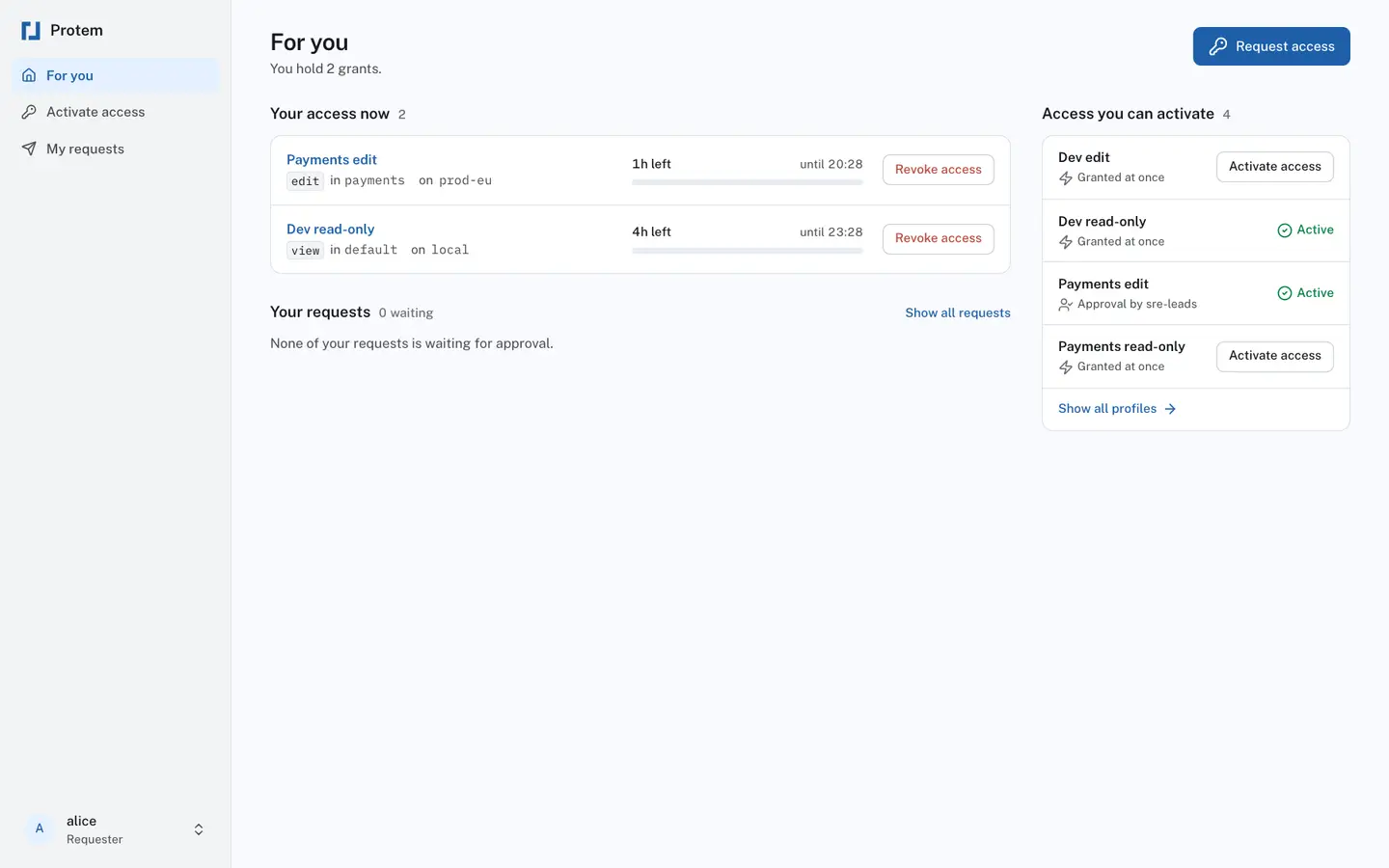
Fill in a reason (for example "Look at the pods in default") and choose Request access. Because the profile's rule is Auto, the request shows Approved immediately, with a link to the grant it produced.
Confirm the grant and the binding it created:
$ kubectl get accessrequests,accessgrants -n default
NAME                                      PROFILE        REQUESTER           PHASE      DURATION   GRANT
accessrequest.protem.dev/req-...          read-default   alice@company.com   Approved   1h0m0s     grant-req-...

NAME                                        PROFILE        REQUESTER           ROLE   PHASE    EXPIRES AT
accessgrant.protem.dev/grant-req-...        read-default   alice@company.com   view   Active   2026-11-24T21:53:55Z

$ kubectl get rolebindings -n default -l protem.dev/managed-by=protem
NAME                                       ROLE               AGE
protem-grant-default.grant-req-...         ClusterRole/view   6s

$ kubectl auth can-i list pods -n default --as alice@company.com
yes
The grant and the binding both carry the role your profile named, and kubectl auth can-i proves the access is real, not just a status field.
7. Request the profile that needs approval
Back in the UI, open Activate access and choose Request approval for "Edit the default namespace". Give it a reason (for example "Restart the web deployment") and submit. This time the request's phase is Pending, and it lists what the role allows, flagging the risky rules (reading Secrets, opening a shell in pods) first.
8. Approve it as the approver
Open the account menu and switch to Bob, approver. The sidebar now shows "Approvals, 1 waiting". Open Approvals, open Alice's request, and choose Approve request.
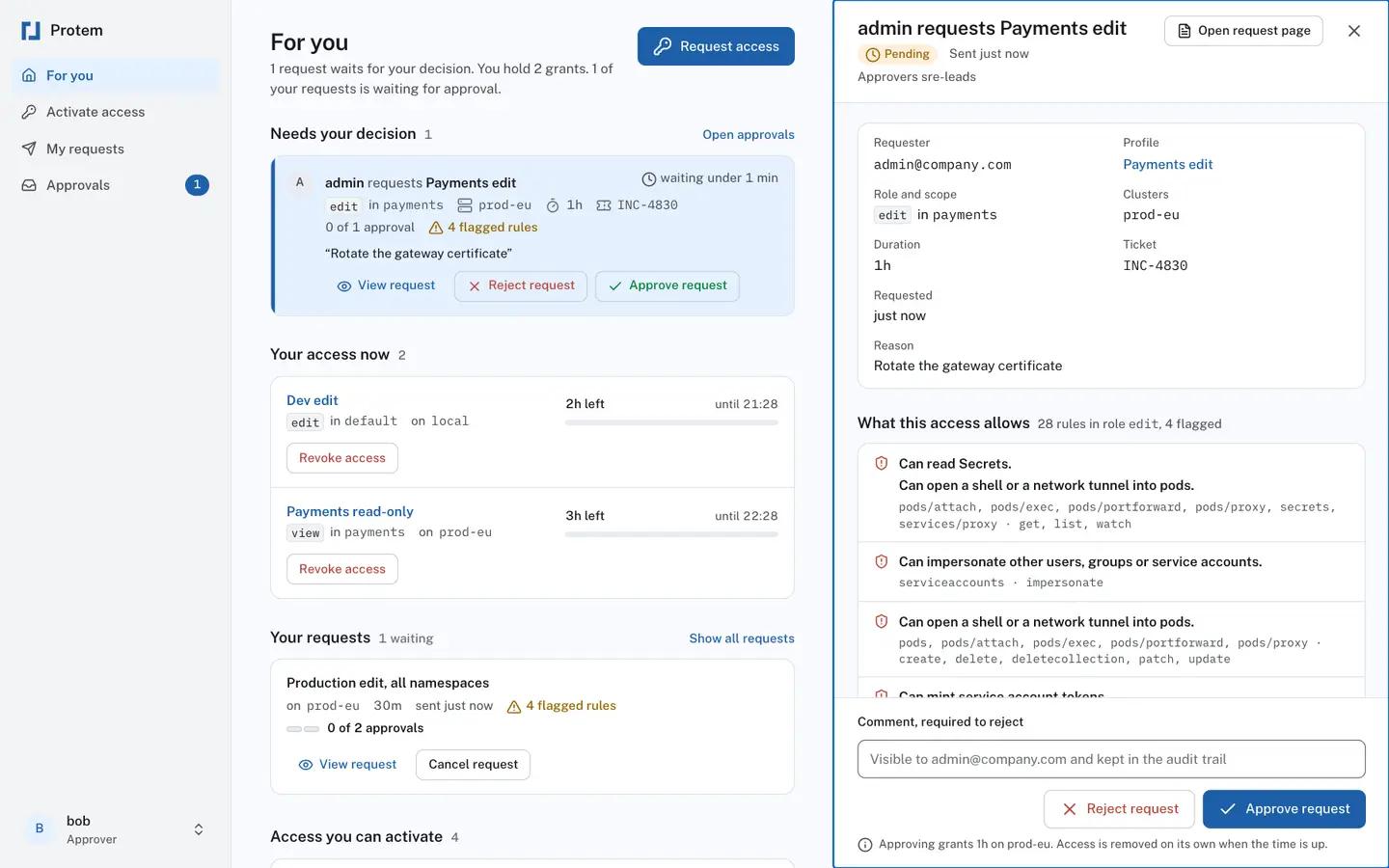
The request moves to Approved and a second AccessGrant and RoleBinding appear, the same way as in step 6:
$ kubectl get accessgrants -n default
NAME                            PROFILE        REQUESTER           ROLE   PHASE    EXPIRES AT
grant-req-...-z68cb             read-default   alice@company.com   view   Active   2026-11-24T21:53:55Z
grant-req-...-27g8n             edit-default   alice@company.com   edit   Active   2026-11-24T20:56:41Z
9. Revoke the first grant
Switch the account menu back to Alice, requester and open For you. You now hold two grants. Choose Revoke access on "Read the default namespace", give a reason, and confirm.
$ kubectl get accessgrants -n default
NAME                   PROFILE        REQUESTER           ROLE   PHASE     EXPIRES AT
grant-req-...-z68cb    read-default   alice@company.com   view   Revoked   2026-11-24T21:53:55Z
grant-req-...-27g8n    edit-default   alice@company.com   edit   Active    2026-11-24T20:56:41Z

$ kubectl get rolebindings -n default -l protem.dev/managed-by=protem
NAME                        ROLE               AGE
protem-grant-...-27g8n      ClusterRole/edit   27s
The view binding is gone and kubectl auth can-i list pods -n default --as alice@company.com now answers no for that role, while the edit grant from step 8 is still active.
10. Watch the remaining grant expire
The edit-default profile's duration is two minutes, which has likely already passed. Within a few seconds of its expiresAt time:
$ kubectl get accessgrants -n default
NAME                   PROFILE        REQUESTER           ROLE   PHASE     EXPIRES AT
grant-req-...-z68cb    read-default   alice@company.com   view   Revoked   2026-11-24T21:53:55Z
grant-req-...-27g8n    edit-default   alice@company.com   edit   Expired   2026-11-24T20:56:41Z

$ kubectl get rolebindings -n default -l protem.dev/managed-by=protem
No resources found in default namespace.

$ kubectl auth can-i list pods -n default --as alice@company.com
no
Nobody revoked it: the grant's own expiry time ended it, and both grants from this tutorial have now left no binding behind.
Where to go next
- Concepts explains every resource you just created.
- How to check who had access shows the same two requests on the Audit page.
- How to install the hub with Helm moves from this local trial to a real deployment.